# Migrating a Custom Domain for GitHub Pages
Table of Contents
Introduction
I recently decided to switch to alexravenna.com as the canonical domain for this website.
I already bought the domain a long time ago (woohoo!), but for some reason had originally decided to have alexravenna.is-a.dev be the default domain for this site and have every other domain redirect to that.
Terminology
First, let’s take a quick refresher on the terms behind a URL like https://alexravenna.github.io to avoid confusion later:
| URL Section | Term |
|---|---|
| https | scheme |
| alexravenna | subdomain label |
| alexravenna.github.io | subdomain |
| github.io | apex domain |
| io | top-level domain (TLD) |
GitHub Pages Default Domain Name
This website is hosted on GitHub Pages, which automatically gives it the domain alexravenna.github.io. That domain comes from my GitHub username, “alexravenna”.
As described in the documentation, the code for a website hosted on GitHub Pages has to be located in a repository of the name
<GITHUB-USERNAME>.github.iofor example: alexravenna.github.io (click to be taken to the repository). You can only create one such GitHub Pages website per GitHub username.
I thought that alexravenna.github.io was too boring, so I decided I’d rather use a custom domain!
Custom .is-a.dev Subdomain
I stumbled upon the is-a.dev project at some point, which allows anyone to create a custom subdomain under the “is-a.dev” apex domain for free. Since I’m a software developer, that appealed to me!
That means that if you follow the registration process for GitHub Pages - maybe I’ll make a post about that someday, since it was more complicated than I expected - you receive a free domain at
<GITHUB-USERNAME>.is-a.devHowever, in order to make alexravenna.is-a.dev be the final destination for alexravenna.com too, it was necessary to configure a redirect:
alexravenna.com -> alexravenna.is-a.devOriginal Redirect
Here’s the original redirect configured in my domain provider, Hostinger:

If this were still active, this would mean that inputting “alexravenna.com” into your browser would always automatically take you to “https://alexravenna.is-a.dev” without you having to do anything.
Migrating Domains
When this post goes live, you should always be redirected to this final URL
http://alexravenna.com/posts/migrate-github-pages-domainand not to
http://alexravenna.is-a.dev/posts/migrate-github-pages-domainHow did I achieve that?
-
First, I removed the redirect configuration from my domain provider (see the screenshot above). They informed me:
 However, the removal of the redirect seemed to happen basically immediately. After that
 alexravenna.comloaded a default “Parked domain name” page from my domain provider. -
Next, I updated the GitHub Pages setting for the code repository. That’s where you have to tell GitHub that you’re using a custom domain instead of the default
<GITHUB-USERNAME>-github.iodomain. The previous configuration for thealexravenna.is-a.devcustom domain looked like this: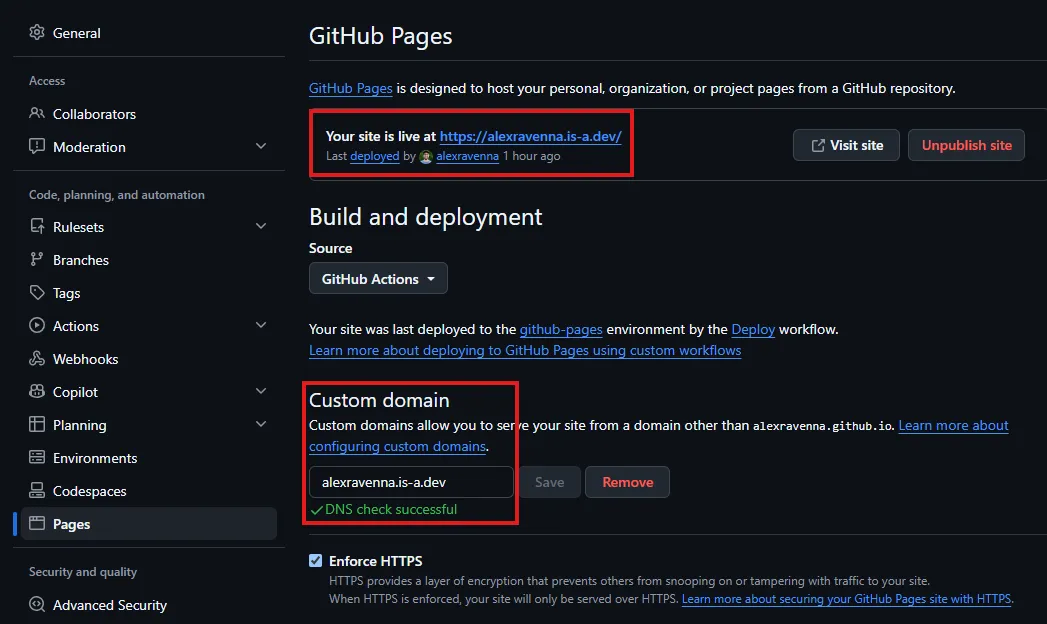 I changed the entry under “Custom domain” to “alexravenna.com”:
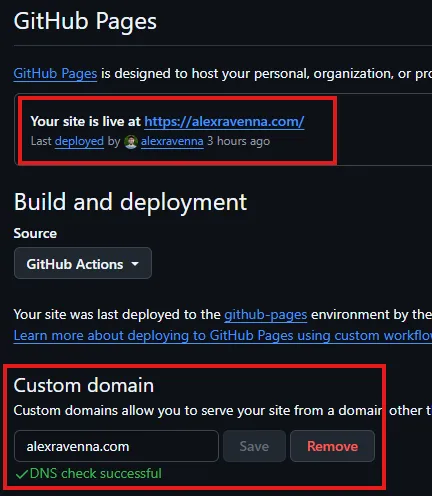 GitHub does a DNS check after you save to make sure the new domain can be resolved.
 -
I adjusted the configuration in code for this website so that Astro can correctly generate links. That was just a one-line change to
site.config.ts- see this commit. -
I re-deployed the website:
- I created a pull request for the code changes as part of my standard release flow
- I merged it to
main, which kicks off the “deploy” GitHub Action
-
I crossed my fingers and hoped that everything would work in the end!
Update #1: Verify the “New” Custom Domain
Hah! Of course not everything worked 😆. After waiting a little, I noticed that the “Parked domain page” for alexravenna.com was still there and that the GitHub Pages configuration started giving me an DNS check error:
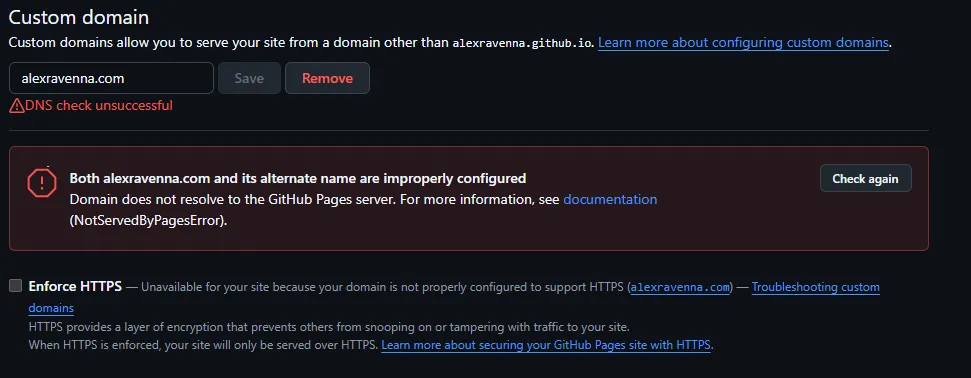
I had forgotten something: to verify the “new” custom domain alexravenna.com with GitHub Pages! This is necessary whenever you want to use a custom domain for GitHub pages; I did it when I originally set up alexravenna.is-a.dev.
Start Verifying Custom Domain
In order to verify domains, you have to go to your GitHub account settings (NOT the settings for the repository where your website code is) and then to the Pages settings:

As you can see, alexravenna.is-a.dev is in the list, but alexravenna.com is not! Let’s change that by clicking on “Add a domain”.

Then you are asked to make some changes in your DNS configuration:
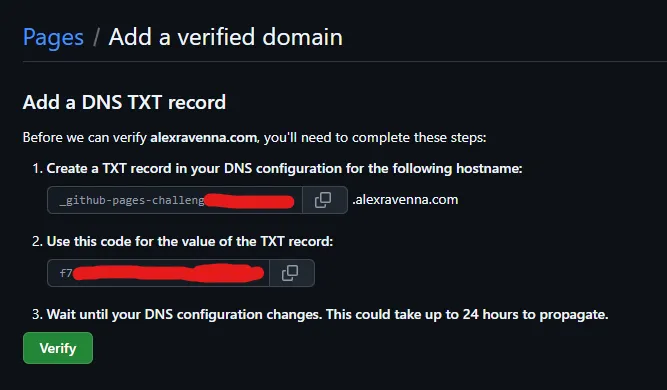
These steps are (ignore the red redaction I made, these values are published publically, I just didn’t know that at the time):
- Create a TXT record in your DNS configuration for the following hostname:
_github-pages-challenge-alexravenna.alexravenna.com - Use this code for the value of the TXT record:
f7ab6bae7659743478f7ab26089473 - Wait until your DNS configuration changes. This could take up to 24 hours to propagate.
Create DNS TXT Record
Thankfully when I deleted the previous redirect I had seen a page in my domain provider account that should be just what I need:
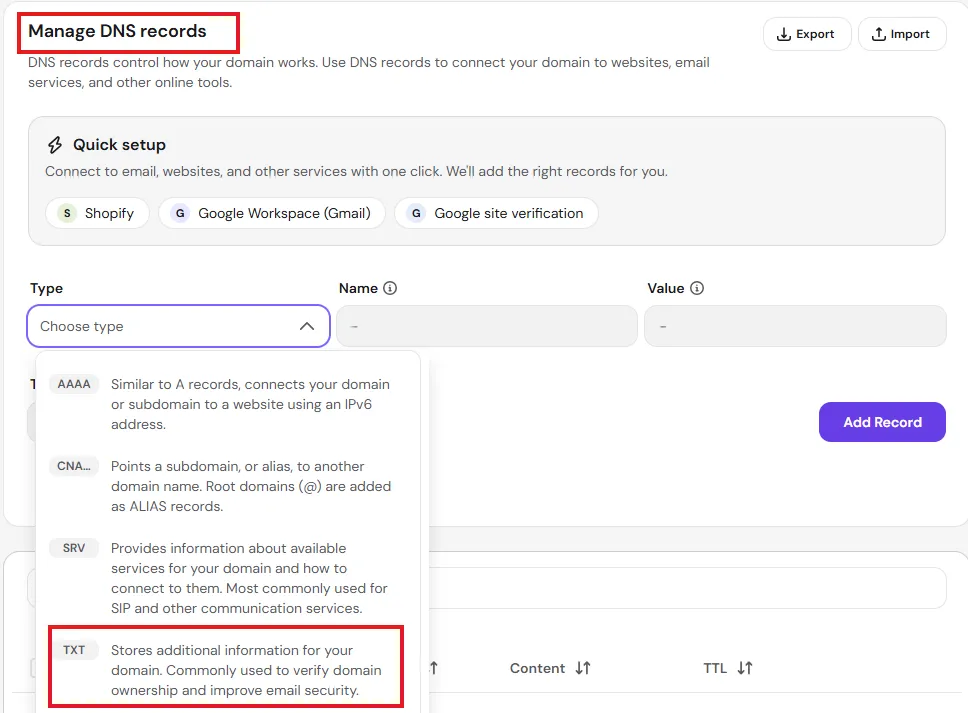
I entered the values as provided by GitHub and added the record:

I went back over to GitHub and clicked “Verify” and was thankfully greeted with a successful notification:
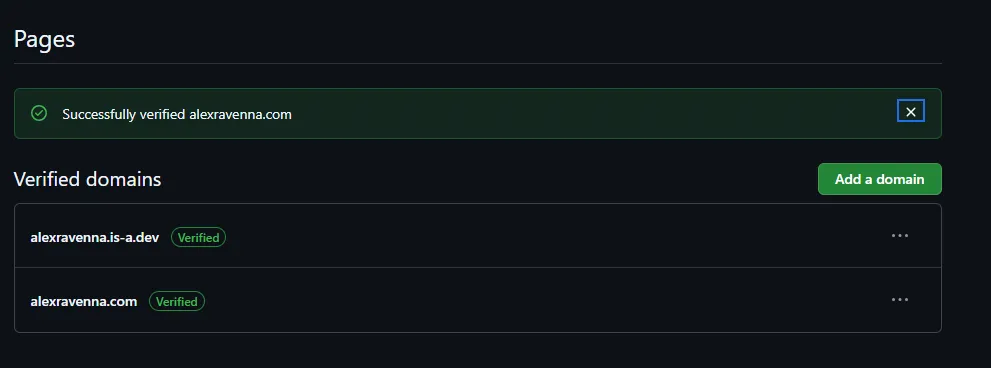
But still no luck! The “parked domain page” still showed for alexravenna.com and GitHub Pages still gave me the same error.
Update #2: Update Additional DNS Records
After doing some research I came back smarter. The problem was with the DNS records still present with my domain provider:
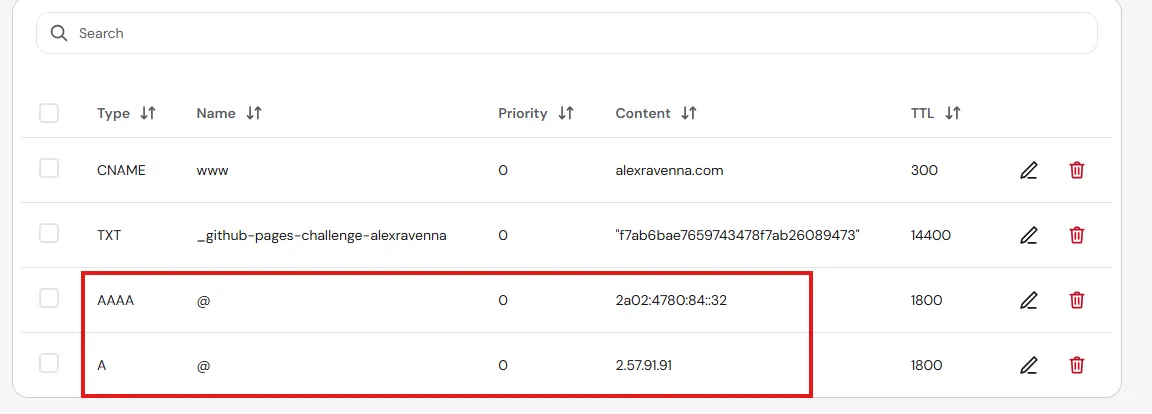
These two A and AAAA records point DNS to the IPv4 and IPv6 addresses of my domain provider, Hostinger. That’s why navigating to alexravenna.com currently loads the “parked domain page” from them. A DNS lookup at whatsmydns.net confirmed that alexravenna.com only points to Hostinger, not GitHub Pages.
I had to tell Hostinger to forward requests to alexravenna.com to the GitHub IP addresses as described at Configuring an apex domain:
- 185.199.108.153
- 185.199.109.153
- 185.199.110.153
- 185.199.111.153
This sounds like it will work! So I deleted the A and AAAA records for Hostinger and added the A records for GitHub Pages:
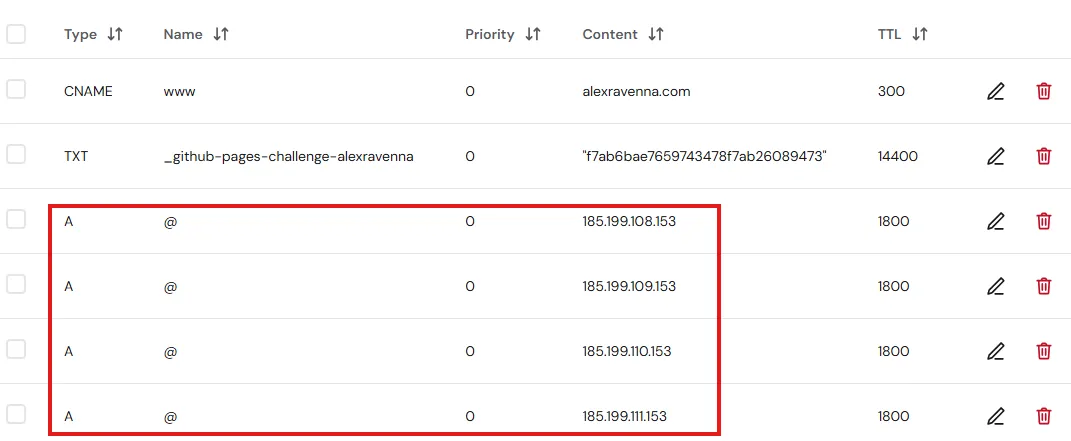
Maybe I’ll add the AAAA (IPv6) records at some point, but I don’t think those will matter for awhile.
DNS Propagation
A new check of whatsmydns.net showed me that DNS propagation was already taking place and resolving the GitHub Pages IP addresses instead of Hostinger’s:
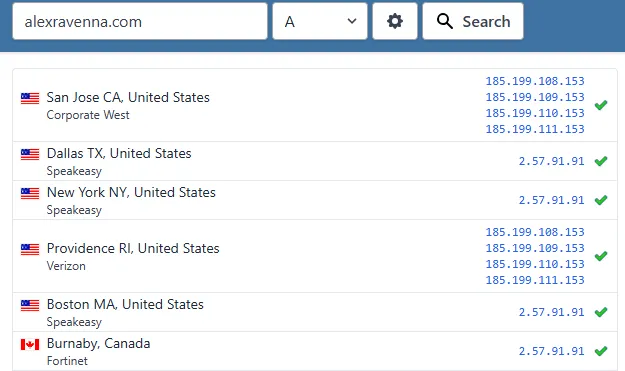
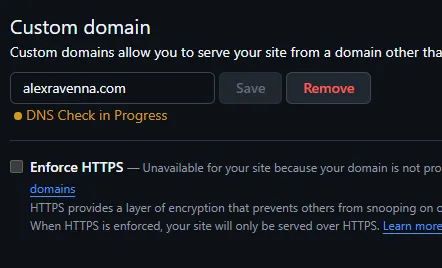
It can only be a matter of time! GitHub showed me for a long time that the DNS check was in progress, which made me somewhat anxious:
At long last, it was successful!
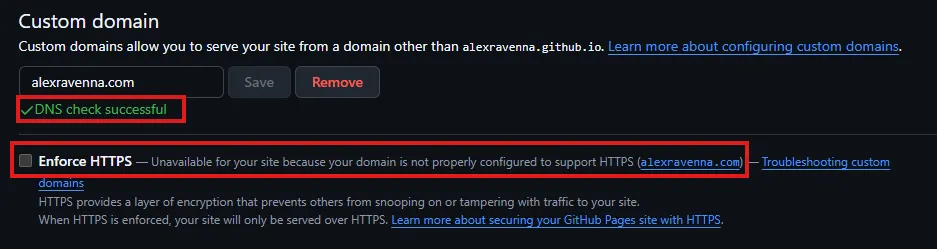
However, HTTPS enforcement wasn’t possible for some reason, which is a big no-go nowadays. So the website was theoretically accessible in the browser, but only with a very big warning that the website was not secure. Not good!
Hm. Well, the GitHub Pages documentation does say that it may take up to 24 hours for the HTTPS enforcement option to be available…I’ll give it some time.
Update #3: Good Things Come to Those Who Wait
When I checked four hours later, things looked much better! DNS propagation according to whatsmydns.net was almost fully complete (two locations were red, but no locations still showed the Hostinger IP address):
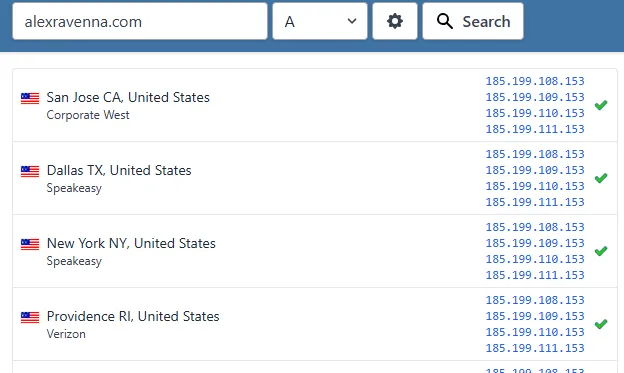
And GitHub Pages allowed me to enforce HTTPS, so of course I did:
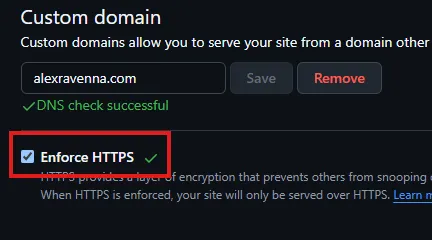
Success! 🎉
Conclusion
Now you can browse alexravenna.com and read this first post 😁.